HighLevel Black Friday + Cyber Week, Nov 23 to Dec 6: 50% off your first 3 months, plus upgrade and add-on deals and a bonus from Yotomations.HighLevel 50% off for 3 months, Nov 23 to Dec 6. Find my deal
The GoHighLevel practice of Yotomations LLCAI development, custom software and websites at yotomations.com
New to GHL? Start here
GHL Nugget

Turn On Allow Re-entry So Returning Customers Restart a Workflow

A repeat customer who fills out your form or books again may never get your follow-up. The Allow re-entry setting decides whether a contact can go through the same workflow twice.

Office worker checking an automated follow-up message on her phone
Workflow trick | | 1 min read | By Yaakov (Koby) Oranski, Certified GoHighLevel Admin

Allow re-entry is a toggle in each workflow's Settings. It controls whether a contact who has already been through the workflow can enter it again. When it is off, a returning customer who triggers the workflow a second time does not start it over, so nothing happens.

This catches service businesses all the time. A client books a second appointment, submits your quote form again, or gets tagged for a seasonal tune-up, and the workflow behind that trigger stays silent because the contact was already in it last spring. You never see an error. The follow-up just does not go out.

Turn it on for workflows that should run once per event: appointment reminders, review requests, quote follow-up, repeat-service campaigns. Leave it off for one-time sequences like a new lead welcome series, where a second run would feel odd.

One caveat: re-entry means a contact can receive your messages again. Before you switch it on, check the workflow's Stop on response and Time window settings so repeat runs stay polite. Then use Enrollment history to confirm a returning contact actually enters.

Prefer to watch? The 45-second version

If repeat customers stop getting your follow-ups, Allow Re-entry in GoHighLevel workflow Settings is the toggle you need to flip.

Watch it on its own page, with the transcript.
How to use it

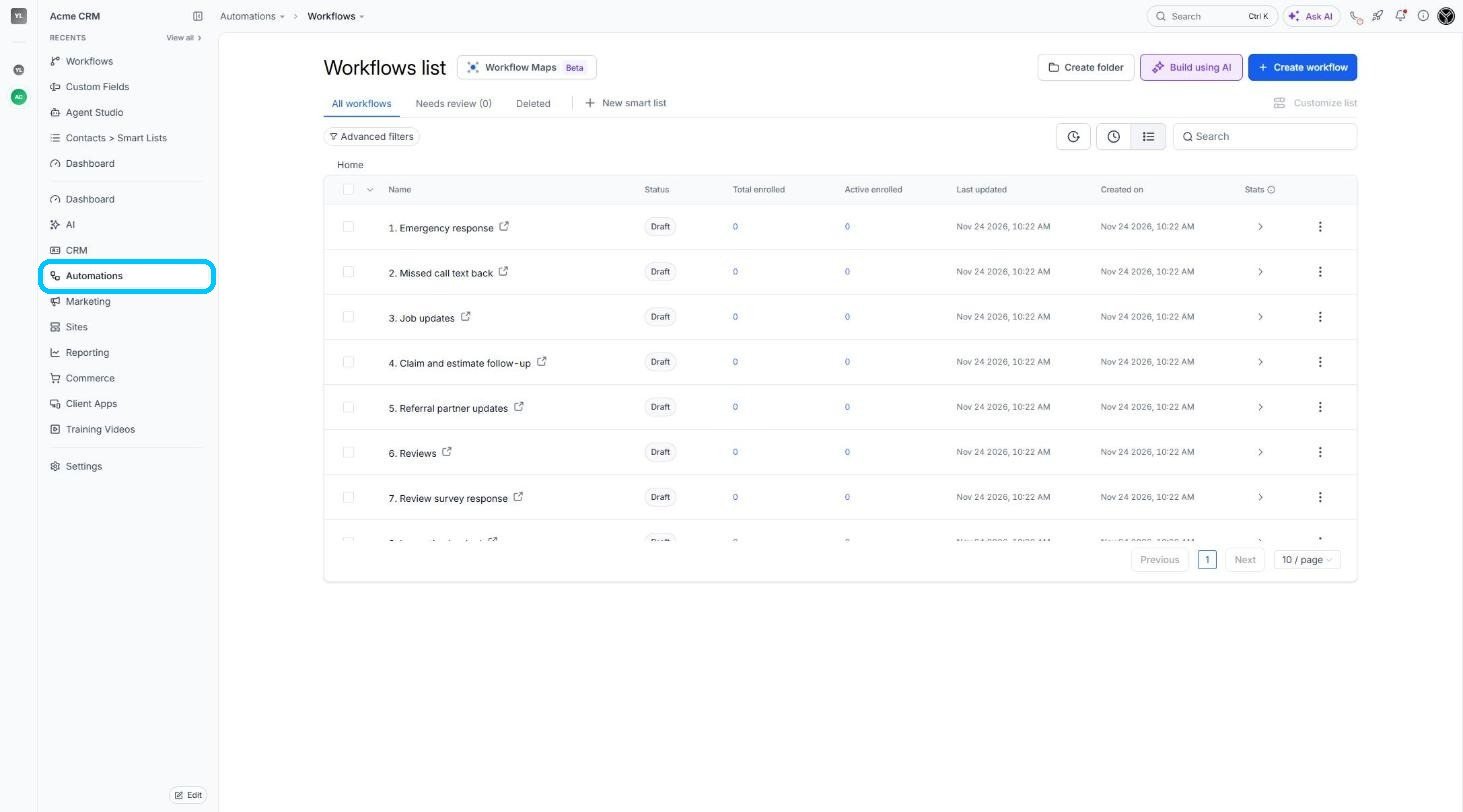
  1. Go to Automations > Workflows and open the workflow that is skipping repeat customers.
    GoHighLevel screenshot: Automations > Workflows, Automations highlighted
    GoHighLevel › Automations › WorkflowsOpen Automations > Workflows and pick the workflow your returning customers are not entering.
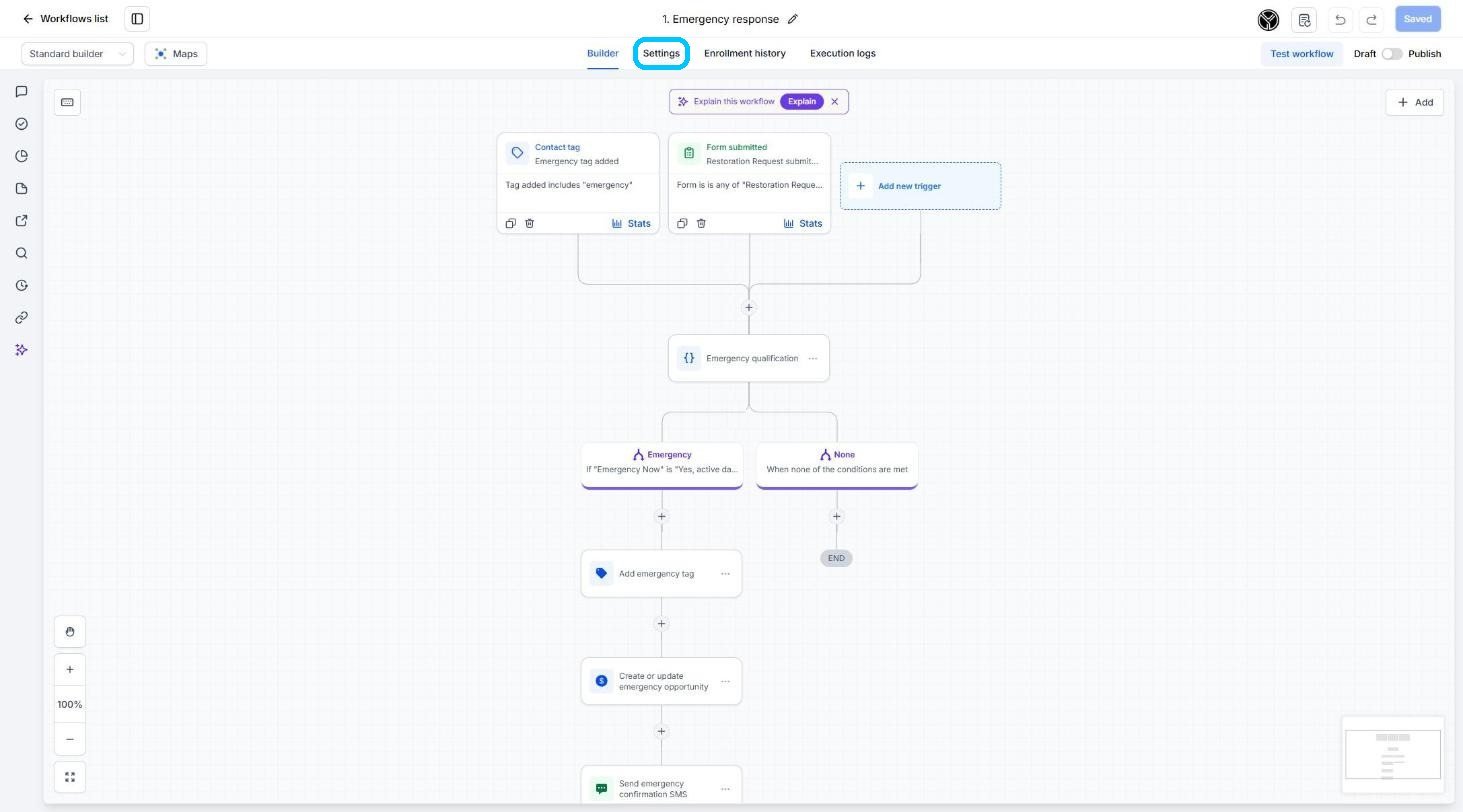
  2. Click Settings in the workflow builder.
    GoHighLevel screenshot: Automations > Workflows > (open a workflow) > Builder, Settings highlighted
    GoHighLevel › Automations › Workflows › (open a workflow) › BuilderInside the workflow builder, click Settings to open the options for this workflow.
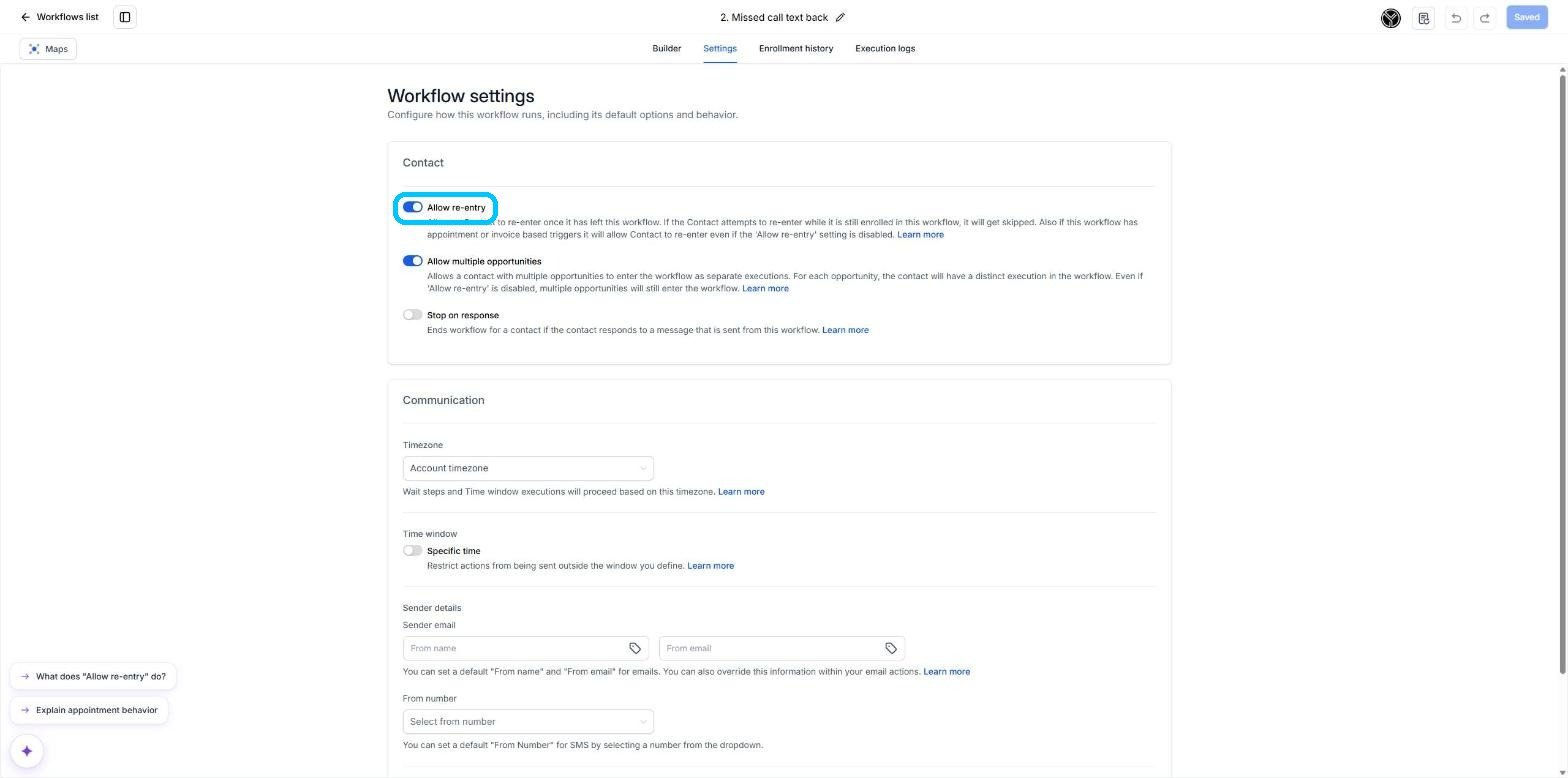
  3. Turn on Allow re-entry.
    GoHighLevel screenshot: Automations > Workflows > (open a workflow) > Settings, Allow re-entry highlighted
    GoHighLevel › Automations › Workflows › (open a workflow) › SettingsSwitch on the Allow re-entry toggle so a contact can go through this workflow more than once.
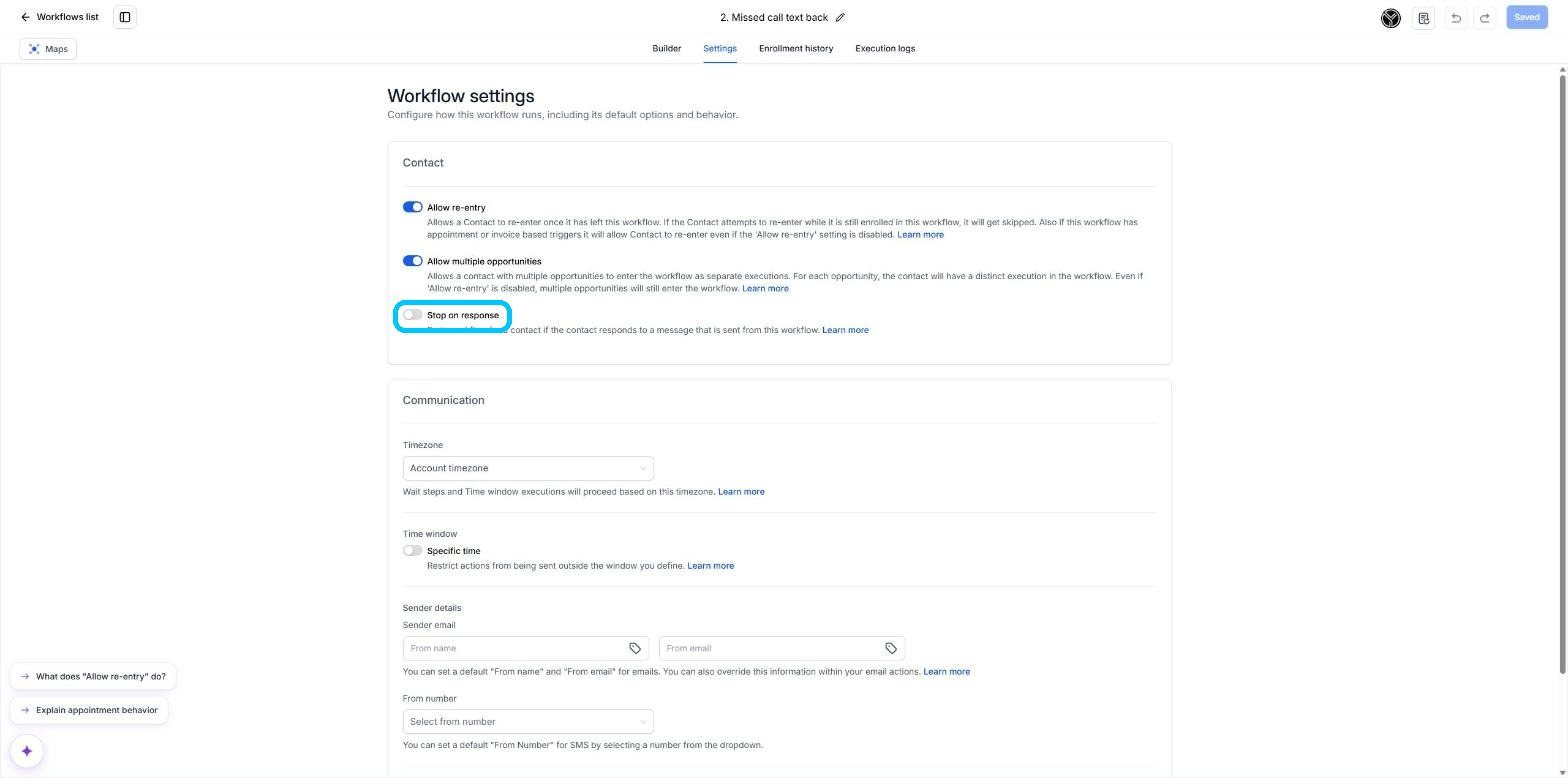
  4. Review Stop on response and Time window, then click Publish.
    GoHighLevel screenshot: Automations > Workflows > (open a workflow) > Settings, Stop on response highlighted
    GoHighLevel › Automations › Workflows › (open a workflow) › SettingsCheck Stop on response here too, so a repeat run ends when the contact replies.
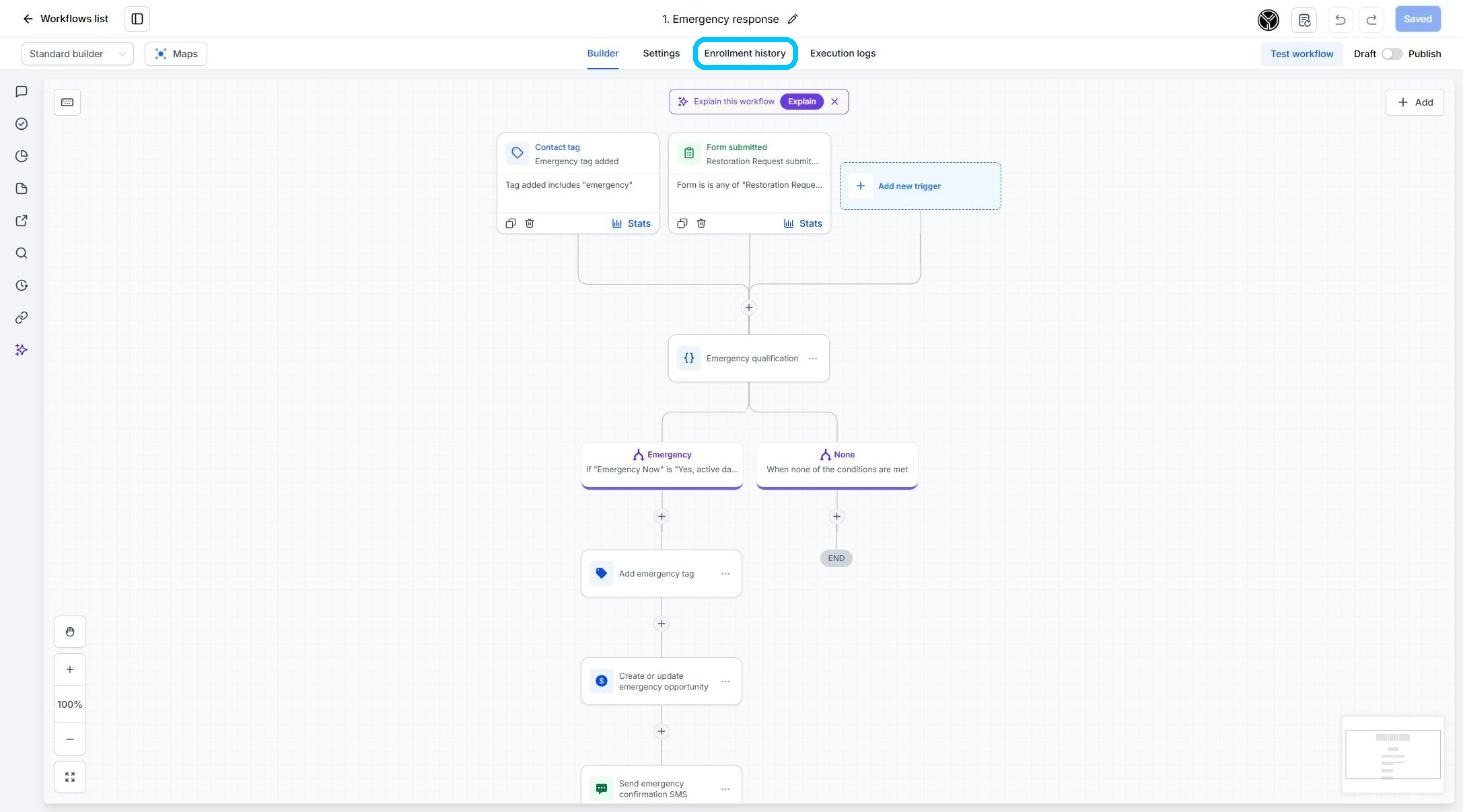
  5. Open Enrollment history after a repeat trigger to confirm the contact entered again.
    GoHighLevel screenshot: Automations > Workflows > (open a workflow) > Builder, Enrollment history highlighted
    GoHighLevel › Automations › Workflows › (open a workflow) › BuilderClick Enrollment history to see whether the returning contact entered the workflow again.

Who it helps

Home service companies, clinics and agencies whose customers come back for repeat bookings, quotes or seasonal work.

Related: Turning on re-entry can cause repeat messages if the workflow is not set up carefully, and this article covers why duplicate texts happen.

Get the next one by email

The newsletter: one short GoHighLevel tip a day or seven every Monday, plus new articles as they publish. Written by a certified admin, not scraped from release notes.

We never spam: you get only what you tick, and every email has a one-click unsubscribe. Your address stays in our own GoHighLevel account and is never sold or shared. Privacy.

More nuggets

Import an n8n Workflow into Agent Studio Instead of Rebuilding ItAgent Studio n8n Import. Menu path: AI Agents > Agent Studio. Go to AI Agents › Agent Studio Then Click Import from and choose n8n (Beta) Then Upload your n8n JSON file, or click...GHL NUGGET #591 min readAgent Studio n8n ImportAI AgentsAgent Studio▶ Video

Import an n8n Workflow into Agent Studio Instead of Rebuilding It

Agent Studio can take an exported n8n workflow, analyze it, and walk you through reviewing and setting it up, so you skip a full manual rebuild inside HighLevel.

| 1 min readRead the nugget
Set the Business Profile Time Zone Before You Build a Sub-AccountBusiness Profile Time Zone. Menu path: Settings > Business Profile. Open the client's sub-account and go to... Then Find the Time Zone field and choose the... Then Click Save at the bottom of the pageGHL NUGGET #581 min readBusiness Profile Time ZoneSettingsBusiness Profile

Set the Business Profile Time Zone Before You Build a Sub-Account

A new sub-account can carry the wrong time zone, so set it in Settings > Business Profile first and your time-based automations run on the clock your client actually keeps.

| 1 min readRead the nugget
Connect Gmail or Outlook with Email Two-Way Sync so Emails Reach the CRMEmail Two-Way Sync. Menu path: Settings > My Profile > Email Two-Way Sync. Go to Settings › My Profile › Email... Then Choose Gmail or Outlook and sign in to... Then Send a test email to that address from...GHL NUGGET #571 min readEmail Two-Way SyncSettingsMy ProfileEmail Two-Way Sync▶ Video

Connect Gmail or Outlook with Email Two-Way Sync so Emails Reach the CRM

Connect your Gmail or Outlook under Settings > My Profile > Email Two-Way Sync so supported incoming email conversations show up in the CRM, where workflows can act on them.

| 1 min readRead the nugget

Want this built in your account?

Book a 30-minute call. We look at your GoHighLevel account live and tell you what we would fix first and what it would cost.

No pitch deck. We look at your current setup and tell you what we would do and what it would cost.

Need more than GoHighLevel? Yotomations, our parent company, also builds AI agents, custom software and websites.