

GoHighLevel vs HubSpot for service businesses: an engineer's comparison
For local and multi-location service businesses, the decision usually comes down to communication channels and cost structure. Here is how we think about it.
Learn moreYou signed up and then stared at it. Here is the order to set up GoHighLevel in week one, what to start first because it takes days, and what to leave switched off.

Short answer: Start your GoHighLevel CRM setup by submitting A2P 10DLC registration, because carrier approval takes days and your texting waits on it. While that clears, fill in custom values, build one calendar and one pipeline, then connect one lead source to one workflow. Add missed-call text back last. Leave everything else off until week two.
A2P 10DLC is the carrier registration that US business texting runs through. You register your business (the brand) and what you plan to text about (the campaign), the carriers review it, and it takes days. Everything else in week one can be built while you wait, but nothing that texts a customer will behave reliably until approval comes through.
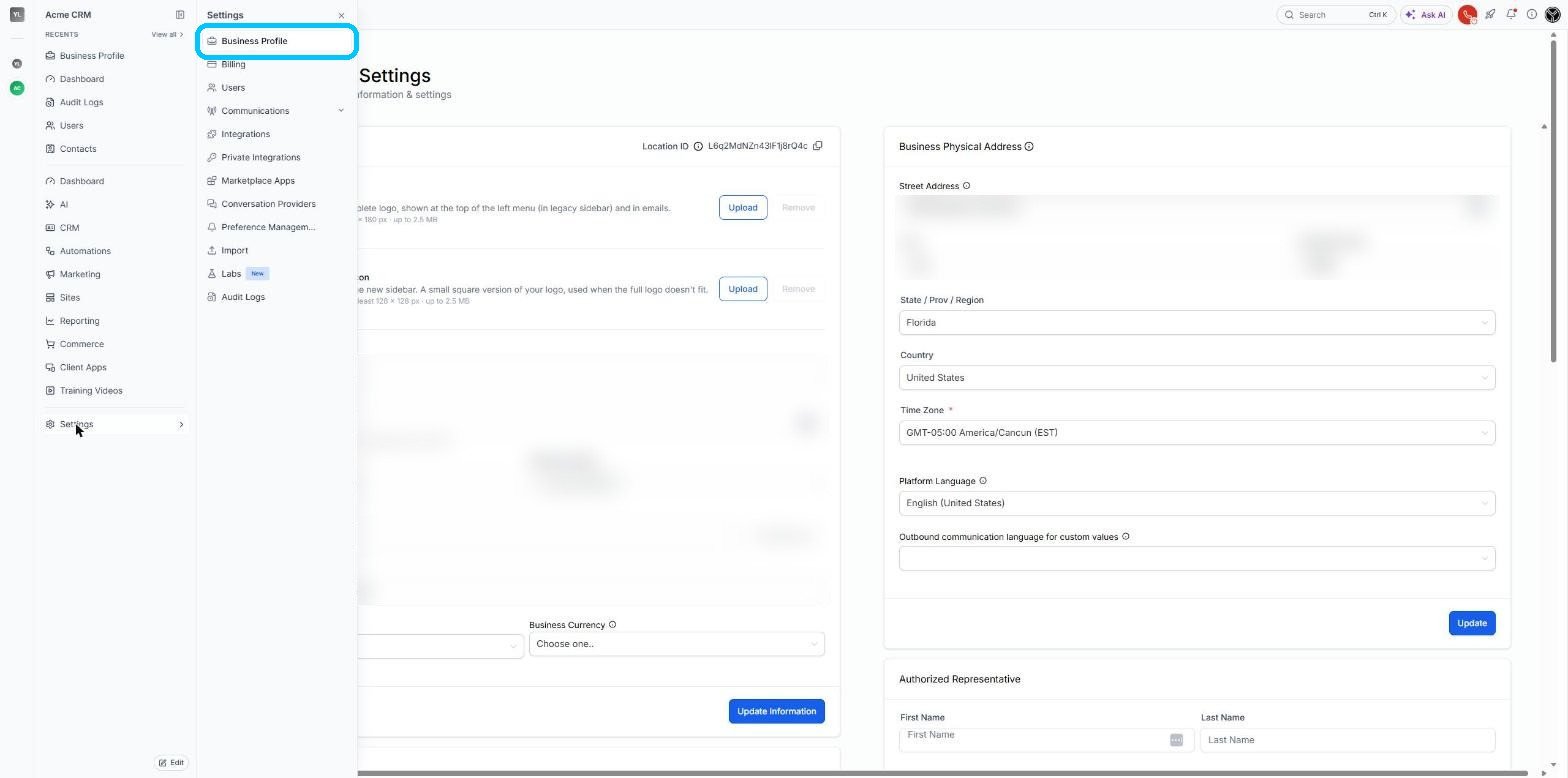
Open Settings and click Business Profile, then enter your legal business name, address, EIN and website exactly as they appear on your IRS paperwork. A mismatch between what you type and what is on file is one of the common reasons a registration bounces.
Our A2P 10DLC approval guide walks through the registration itself, and the rejection guide covers what to fix if it comes back. Your website also needs a privacy policy and a form with consent language, which is what the opt-in checkbox article covers. Consent rules come from the TCPA, which the FCC enforces, and carriers add their own rules on top. This is practical guidance and not legal advice.
Custom values are saved snippets you reference in every message: business name, main phone number, booking link, review link, service area. Fill them in once under Settings > Custom Values and every template pulls from the same place. When your phone number changes, you edit one value instead of hunting through twenty messages.
Then add your users. Give owners admin access and give staff the narrowest role that lets them do their job. Do not create a login for everyone on day one.
Add custom fields only for information you will actually collect and use, such as service type or property address. Deleting them later is slow and painful, and we have seen accounts where nobody could say what half of them were for. If you are staring at that situation, the guide to deleting unused custom fields is the place to start.
Build one calendar for your main service. Connect it to your own Google or Outlook calendar so a booking in GoHighLevel blocks the time you already have taken, and set one confirmation and one reminder. Resist the urge to build a calendar for every service. If your reminders later go out at the wrong time, our reminder troubleshooting guide explains why.
Next, build one pipeline with about five stages: New lead, Contacted, Booked, Quoted, Won. A stage is only useful if something real moves a lead into it, which is the idea behind pipeline stages that move themselves. If you cannot say what event moves a card from one stage to the next, delete the stage.
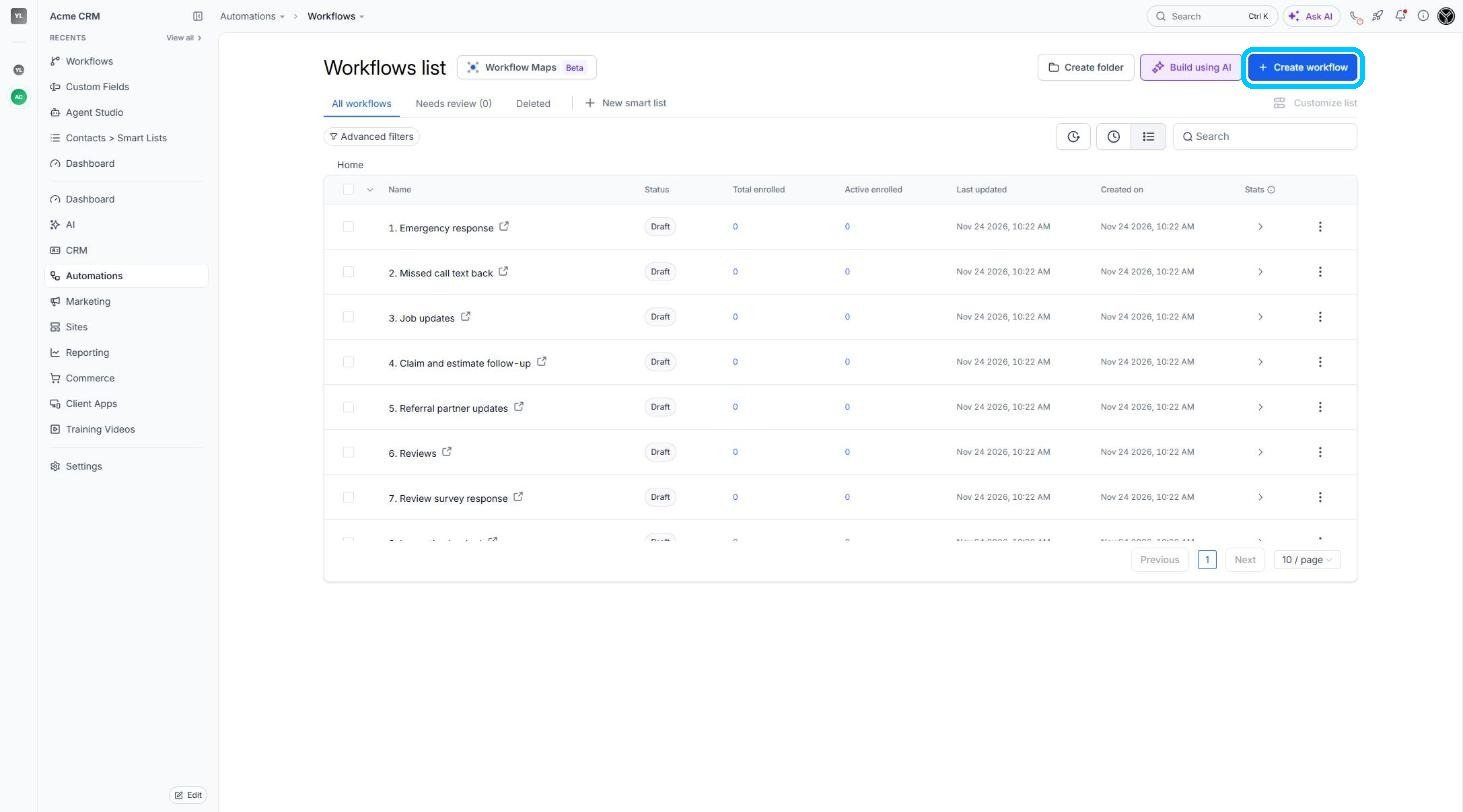
Pick the one place most of your leads come from today: a website form, Facebook, Google or Yelp. Open Automations > Workflows and click Create workflow, then start with a form submitted trigger or the trigger for your chosen source.
Keep the actions short. Create the opportunity in the New lead stage, send a text and an email with your booking link, notify whoever makes the first call, add a wait step, and send one follow-up if nobody has booked. The speed to lead system shows the full five-minute version.
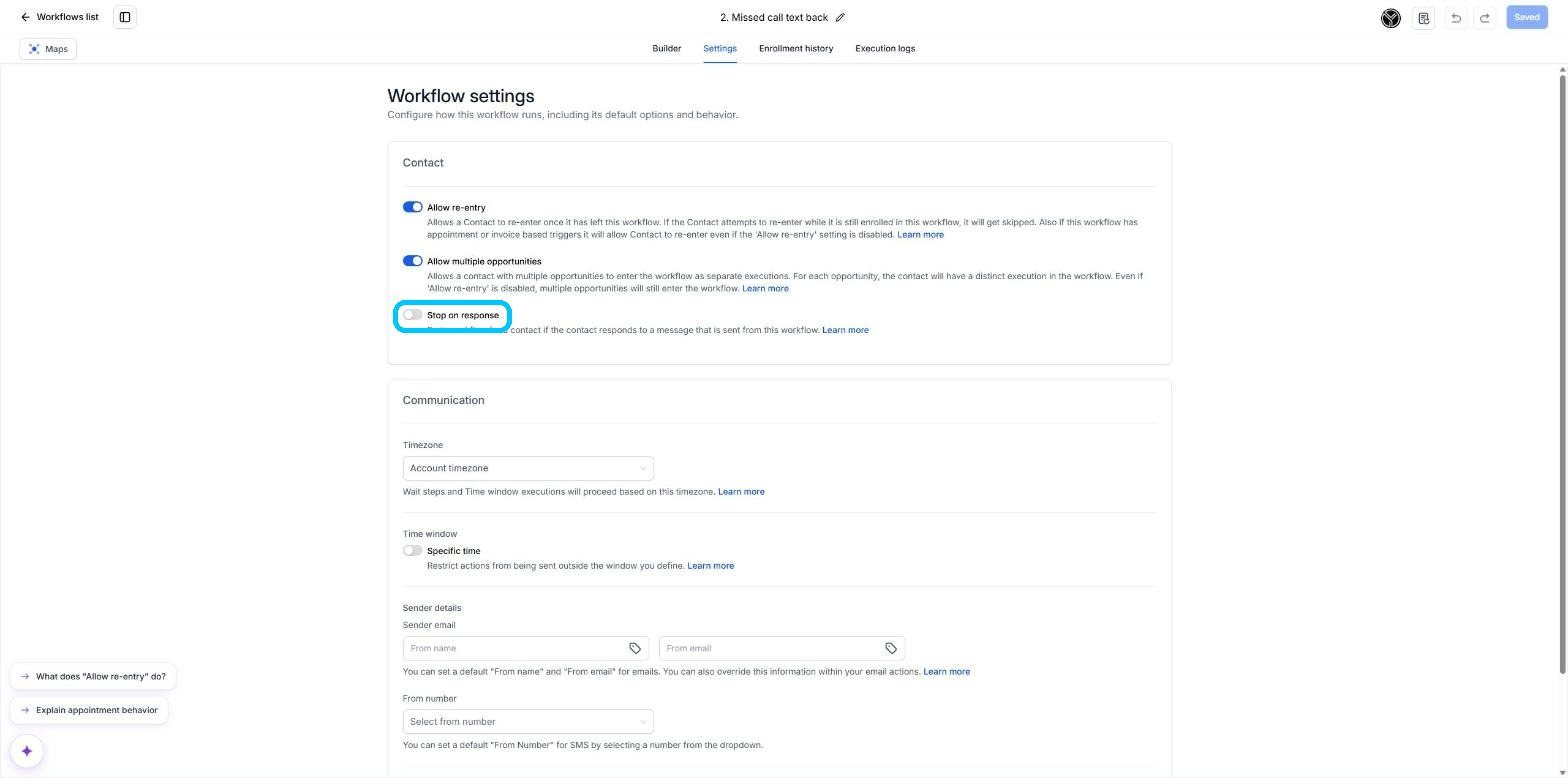
Then open the workflow Settings tab and turn on Stop on response, so the follow-up ends once the customer replies. If you skip it, you get the problem described in our article on follow-ups that keep sending after a reply.
While A2P is pending, the email half of this workflow can work, as long as your sending domain is set up correctly. If emails land in spam, check the sending domain guide. Test the whole thing by submitting your own form from your own phone.
Missed-call text back sends a text when someone calls and nobody picks up. It goes last because it is a text, so it depends on your approved registration, and because it needs a business number your team actually forwards or answers. Our missed-call text back setup guide has the copy and the common mistakes, and the consent article explains how consent applies to it.
Call your own number from a second phone, let it ring out, and confirm the text arrives. Then check that the contact and the conversation show up where your team will look.
| Turn on now | Leave off until week two or later |
|---|---|
| A2P registration | Texting your whole old contact list |
| One calendar | A separate calendar for every service and team member |
| One pipeline, five stages | Extra pipelines for every lead type |
| One lead source into one workflow | Large marketplace snapshots you have not read |
| Missed-call text back | AI chat and voice agents |
Every extra piece is something you have to debug when a text goes out wrong. We once inherited an account with 160 workflows, 242 tags and six pipelines, and nobody on the team could say which ones were live. Small accounts are easy to fix, and big ones take an audit first.
Your old contact list deserves a proper campaign once the basics work, and the database reactivation guide covers how. AI agents also earn their place after the plain workflow is running, and the AI chatbot setup guide is where to go next.
If we were setting this up for you, we would submit A2P on day one from your actual paperwork, then build the calendar, the pipeline and one lead workflow in that order. Before anyone else touched it, we would test it with a real form submission from a phone. If you want to see where your current account stands, the GoHighLevel health check is free.
For a done-for-you build, our GoHighLevel automation service uses fixed-scope milestone pricing with no hourly billing and no mandatory retainer. You can also book a free 30-minute discovery call and we will tell you what to do yourself and what is worth paying for. GoHighLevel is a trademark of HighLevel Inc.; Yotomations is independent.

Yaakov (Koby) Oranski, Founder and CEO of Yotomations
Certified GoHighLevel Admin and Partner. Koby designs CRM migrations, two-way integrations, billing systems and AI agents for service businesses, and writes from the engagements described on this site.
A working first setup with one calendar, one pipeline and one lead workflow is a few days of focused work. The part you cannot speed up is A2P 10DLC approval, which takes days after you submit. That is why it goes first.
No. You can build calendars, pipelines, forms and email while registration is pending. What you cannot rely on is texting US customers, so any workflow that sends texts should be tested only after approval comes through.
Only if you have read what is inside it. A marketplace snapshot can bring in dozens of workflows, tags and pipelines you did not ask for, and each one is something you now have to understand. Starting small and adding pieces is easier to fix.
You can do week one yourself if you follow the order and keep it small. Hiring makes sense when you have a system you already run, such as Jobber or an EMR, that needs to sync, or when you do not have the hours. Our done for you versus DIY comparison lays out the tradeoffs.
Submit your A2P registration. It is the one step with a waiting period, so every day you delay it delays your texting by a day.
For local and multi-location service businesses, the decision usually comes down to communication channels and cost structure. Here is how we think about it.
Learn more
A plain-language explanation of GHL: what it replaces, what it does well, what it does not, and how to decide whether you need help setting it up.
Learn more
The standard trial is 14 days. The Bootcamp trial is 30, with live onboarding. Here is how to start it, which plan to pick, what to do on day one and how to spend the month so you know whether GoHighLevel fits.
Learn moreBook a 30-minute call. We look at the account live and tell you what is broken, what we would fix first and what it would cost.
No pitch deck. We look at your current setup and tell you what we would do and what it would cost.Need more than GoHighLevel? Yotomations, our parent company, also builds AI agents, custom software and websites.