HighLevel Black Friday + Cyber Week, Nov 23 to Dec 6: 50% off your first 3 months, plus upgrade and add-on deals and a bonus from Yotomations.HighLevel 50% off for 3 months, Nov 23 to Dec 6.Find my deal
How to Send a Reminder Before a Contract or Renewal Date in GoHighLevel
Renewals slip because the date lives in someone's head. Here is how to put it on the opportunity and have GoHighLevel remind the owner and the client at 60, 30 and 7 days.
Short answer: Put the contract or renewal date in an opportunity date field, then build a workflow with the Custom Date Reminder trigger on that field and set Before Number of Days to how far ahead you want the reminder. Add an Internal Notification to the opportunity owner and, if a contact is linked, an email or text to the client. Since November 2026 the workflow can use the opportunity's own name and fields directly, so the old Find Opportunity step is no longer needed.
Why renewals slip in the first place
In most accounts we open, the renewal date is in a spreadsheet, a calendar note or the account manager's memory. The opportunity says Won and then nobody touches it for eleven months. By the time someone remembers, the client has already priced a competitor.
Insurance agencies, property managers, IT service companies and agencies with annual retainers all have the same problem. The fix is not a smarter person. It is a date stored on the deal and a workflow that reads it.
Step 1: store the date on the opportunity
Create one date field for the thing you renew. Open CRM > Custom Fields, switch to the Opportunity tab and click Create field, then pick a date type and name it plainly, such as Renewal Date or Contract End Date.
GoHighLevel › CRM › Custom FieldsIn CRM > Custom Fields, choose the Opportunity tab and click Create field to add the renewal date.
Then make filling it part of closing the deal. When an opportunity moves to Won, the renewal date should be set the same day. HighLevel's Custom Date Reminder help article says the trigger does not fire for records with no value in the date field. A blank field fails silently, so it is worth a weekly smart list or report of won deals with no renewal date.
Step 2: build the reminder workflow
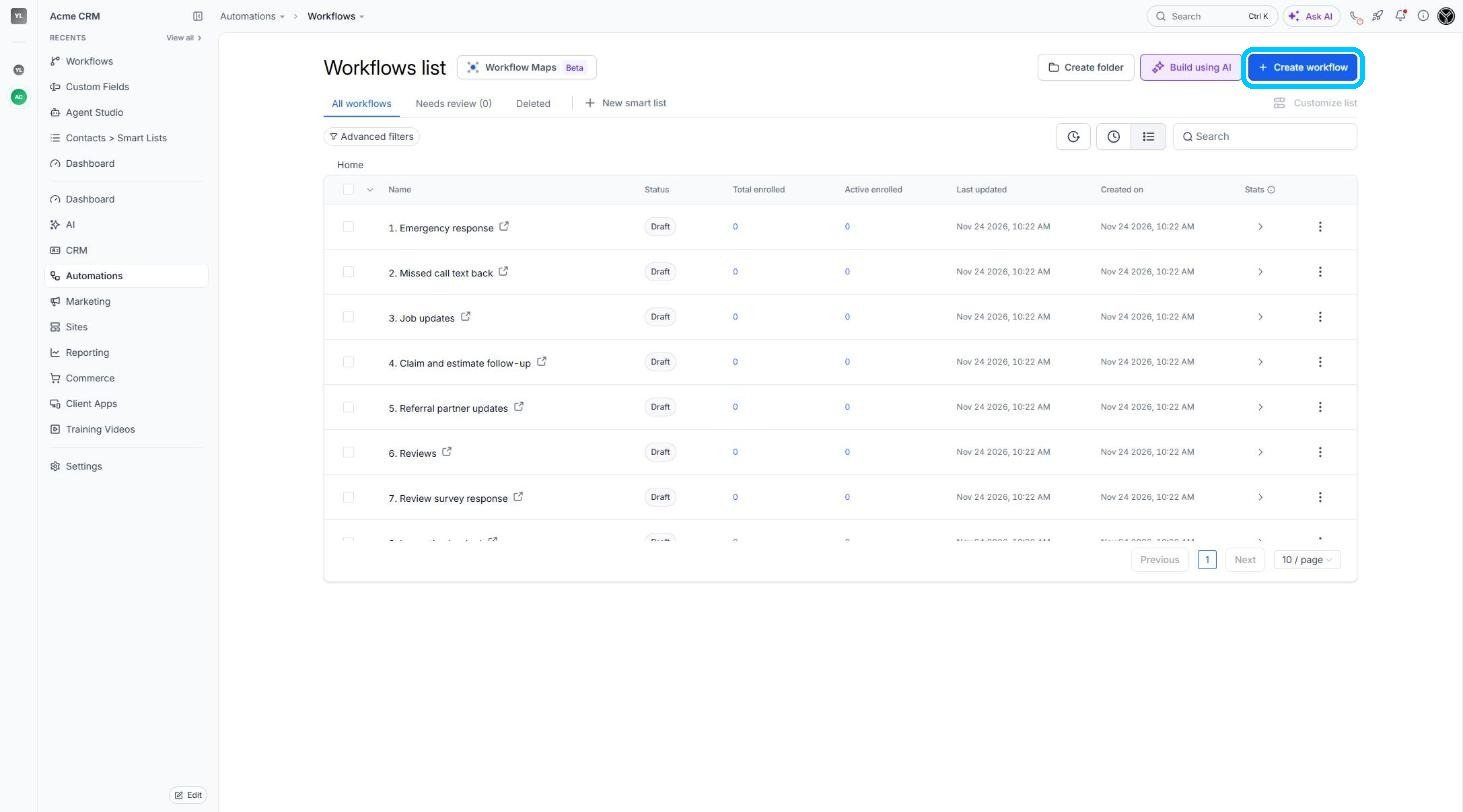
Open Automations > Workflows and click Create workflow, starting from scratch.
GoHighLevel › Automations › WorkflowsOpen Automations > Workflows and click Create workflow to start a blank renewal reminder.
In the builder, click Add new trigger and choose Custom Date Reminder. HighLevel's changelog says contact-based workflows can now use opportunity date fields with this trigger, alongside contact dates.
GoHighLevel › Automations › Workflows › (open a workflow) › BuilderIn the workflow builder, click Add new trigger and pick Custom Date Reminder.
Set the filters:
Custom date field: your Renewal Date opportunity field.
Before Number of Days: how far ahead to run, for example 30.
Match on Year Along with Day and Month: HighLevel describes this as firing only when the year in the date field matches the current year. For a contract date that includes the year, turning it on keeps an old date from firing again next year.
Has Tag (optional): limit it to clients tagged for renewal, if not every deal renews.
If you want reminders at 60, 30 and 7 days, the help article says to use separate triggers. We build one short workflow per reminder point. Each has its own trigger and its own wording, and you can switch one off without touching the others.
Step 3: tell the owner, then the client
Add an Internal Notification first. HighLevel's November 2026 update lets you send it to the Owner of the opportunity or to Opportunity followers, and lets the message use opportunity values from the Opportunity menu in the value picker. A notification like "Renewal in 30 days: review {{opportunity.name}} and book the renewal call" now fills in the deal name with no extra step.
Before this change, the workflow needed a Find Opportunity action to look up the deal before it could read its fields. Existing workflows that still use it keep working, so there is no rush to rebuild them, but new reminders are two steps shorter.
Then decide what the client sees. At 60 days, most of our clients send nothing to the customer and let the owner prepare. At 30 days, an email that names the renewal and offers a call works well. At 7 days, a short text if the client has opted in to texts. These messages need a contact on the opportunity. HighLevel now lets opportunities enter workflows without a contact, and in that case contact actions like email and SMS have no one to send to, so keep the client messages for deals with a linked contact.
Step 4: record what happened
A second November change helps with tracking. Update Contact Field and Create Contact can now write a dynamic value into a Date-Time field, such as the output of a Format Date and Time action. We use it to stamp a Renewal Notice Sent field on the contact, so anyone opening the record can see the last notice date. HighLevel notes that date-only values are stored at 12:00 AM in the location's time zone, and that a bad value skips only that field while the rest of the action runs.
Finally, move the opportunity into a Renewal stage when the 30-day reminder fires. Your pipeline then shows every renewal due this month in one column, which is the report owners ask for.
Test it before a real renewal depends on it
Create a test opportunity with a renewal date a few days out, set a matching Before Number of Days, publish, and wait. HighLevel's documentation does not say what time of day the trigger runs, so check the execution log to see when it fired in your account. Confirm the owner got the notification with the right deal name. If you use our pattern for alerting the team when a client goes silent, the same owner routing applies here.
What we would do first
We would list every recurring date your business depends on (contract ends, policy renewals, annual service visits), give each one an opportunity date field, and backfill the dates on open and won deals before building a single workflow. The reminders are the easy part once the dates are clean. Our Reminder and No-Show Rescue package, starting at $950, covers reminder builds like this, including the test runs. For the pipeline side, see pipeline stages that move themselves.
Certified GoHighLevel Admin and Partner. Koby designs CRM migrations, two-way integrations, billing systems and AI agents for service businesses, and writes from the engagements described on this site.
Published
Frequently asked
Can GoHighLevel remind me before a contract expires?
Yes. Store the contract end date in an opportunity date field, then build a workflow with the Custom Date Reminder trigger on that field and set Before Number of Days. Add an Internal Notification to the opportunity owner and, if you want, an email or text to the client.
How do I send reminders at 60, 30 and 7 days before a renewal?
HighLevel's help article says to use separate triggers when you need more than one timing. The cleanest build is one small workflow per reminder point, each with its own Custom Date Reminder trigger and its own message, so each one can be tested and changed alone.
Do I still need the Find Opportunity action for renewal reminders?
Not when the workflow starts from a Custom Date Reminder on an opportunity date field. HighLevel's changelog says those workflows can now pull opportunity fields, including custom fields, straight from the Opportunity menu in the value picker. Older workflows that use Find Opportunity keep working.
What time of day does a GoHighLevel custom date reminder go out?
HighLevel's documentation for the trigger does not state a send time. Build the workflow with a test opportunity dated a few days out and check the execution log to see when it actually ran in your account before you rely on it.
Keep reading
Database reactivation in GoHighLevel: turning thousands of old leads into booked appointments
You have 2,000 or 20,000 old leads sitting in a CRM. How to import them without duplicates, message them differently from new leads, let AI qualify the replies, and route the live ones to a pipeline your team works.
Learn more
GoHighLevel pipeline automation: how to get stages that move themselves
If your pipeline only moves when someone remembers to drag a card, the numbers in it are fiction. Here is how to make GoHighLevel move stages on its own, and what breaks when you skip a step.
Learn more
Quote Follow-Up Automation for Contractors: Why Nobody Follows Up and How to Fix It
The seven-touch quote follow-up sequence we use for contractors, with timing, channel and the line that gets a callback instead of silence.
Learn more
Is this happening in your account?
Book a 30-minute call. We look at the account live and tell you what is broken, what we would fix first and what it would cost.