

AI voice agents for home services: what to automate first
After-hours answering first, qualification second, full booking third. A rollout order that protects your reputation while it grows your calendar.
Learn moreHighLevel changed Conversation AI so a reply from Meta Business Suite puts the bot to sleep. Here is what that fixes, what it does not, and how to test it.

Short answer: HighLevel's changelog dated November 25, 2026 says that when your team replies to a contact from outside HighLevel, for example from Meta Business Suite, that reply now puts your Conversation AI bot to sleep, the same as a reply sent from HighLevel. If your bot was talking over your staff on Facebook or Instagram, that should now stop. Run a quick test with a dummy contact before you trust it, and test any other outside channel yourself, because the changelog names only one example.
Conversation AI is the GoHighLevel bot that answers inbound messages for you. A basic rule of any bot like this is that it should step back once a person takes over the thread. HighLevel already did that for replies sent from the HighLevel inbox. The changelog entry extends the same behavior to replies sent from outside HighLevel, with Meta Business Suite as its example.
The way the entry reads, the gap used to be real. Your owner or office manager could answer a Facebook or Instagram message from Meta Business Suite, and the bot, which lives inside HighLevel, had no reason to think a person had stepped in. We have seen the practical version of this problem in client accounts: the customer asks about price, the owner answers from his phone, and thirty seconds later the bot sends its own, slightly different, answer.
The bot answers inbound messages. It stops answering when it believes a human is handling the conversation. If the human answer never passes through the HighLevel inbox, the bot has nothing telling it to stand down.
That is why owners describe this as the AI being rude or confused. It is not confused. It followed its one rule, answer the new message, because as far as it could tell nobody else had spoken. The customer sees two replies from the same business, sometimes with different prices or different availability, and decides nobody is minding the shop.
Under the old behavior the usual workaround was to tell the team to reply only from the HighLevel inbox. That works on paper and fails the first time somebody is out on a job with only the Meta app open. The update removes the need for that rule, at least for the case the changelog describes.
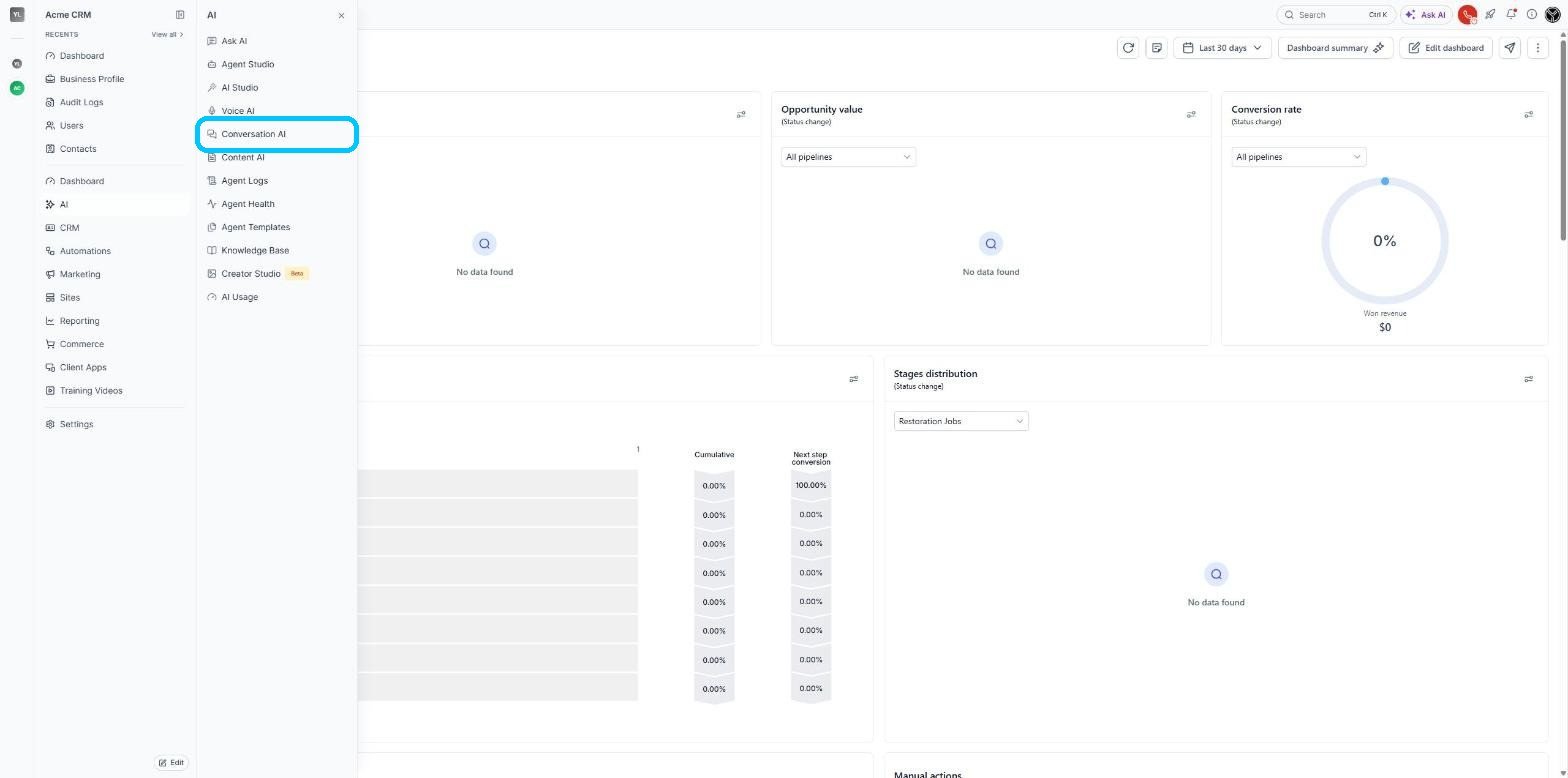
Do not take a changelog line as proof for your own setup. Open the AI menu in the sidebar and click Conversation AI to find your bot and confirm which channels it is switched on for.
Then run this test with a personal Facebook or Instagram account you control, not a real customer:
Write down what happened. If the bot answered the second message anyway, check that the account you messaged is the same page connected to HighLevel, and that your reply was sent as the page, not as a personal profile. Those two mix-ups explain most failed tests we run.
The changelog describes one thing: team replies sent from outside HighLevel putting the Conversation AI bot to sleep. It does not say anything about other senders in your account. A table helps keep these straight.
| Who replied or sent | What the changelog says | What to do |
|---|---|---|
| Team member in the HighLevel inbox | Bot sleeps (already the case) | Nothing, confirm in Agent Logs |
| Team member in Meta Business Suite | Bot now sleeps | Run the ten minute test |
| Team member in any other outside app | Not stated | Test it before you rely on it |
| A workflow sending a follow-up | Not part of this change | Add a stop rule inside the workflow |
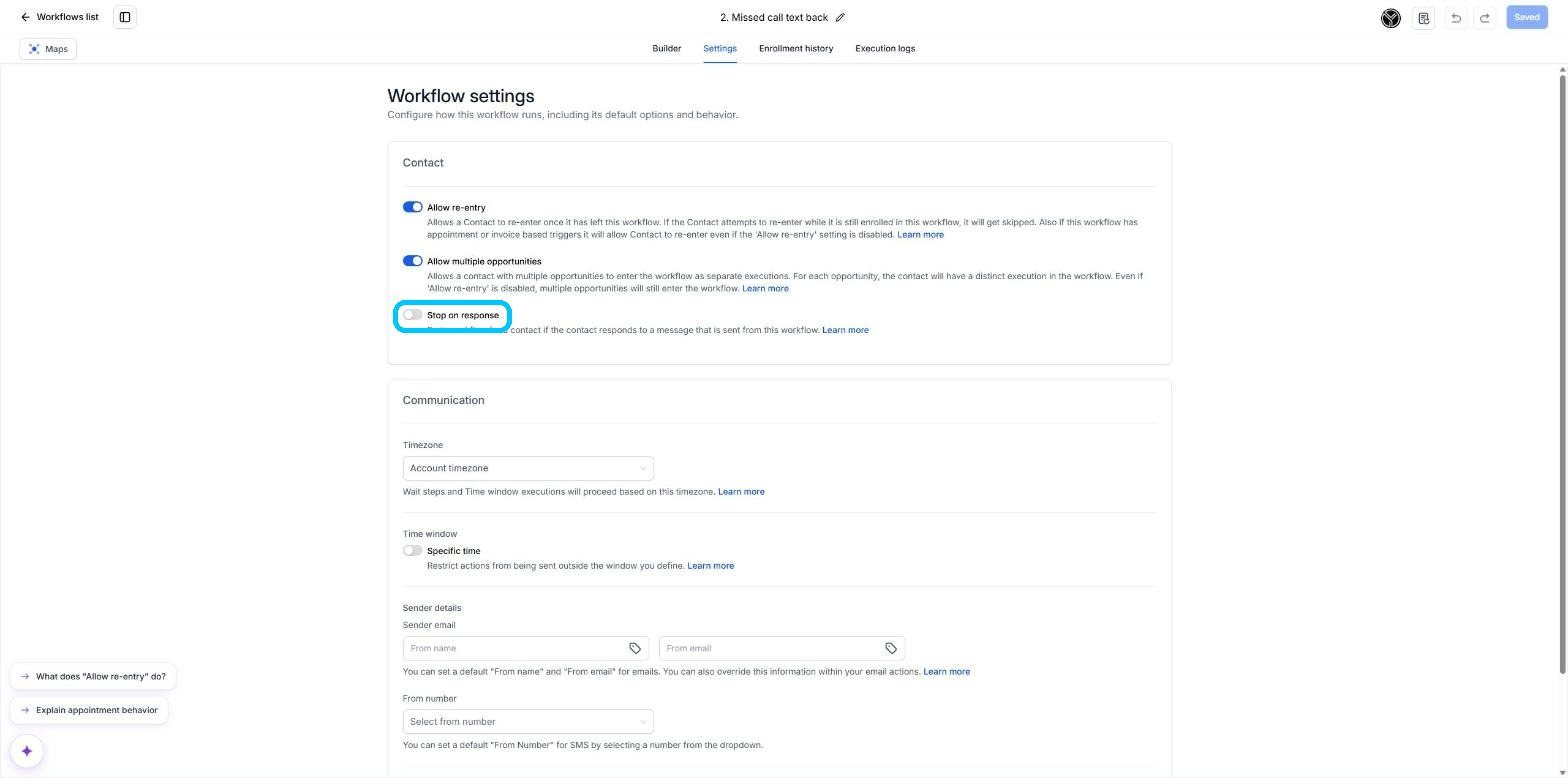
The workflow row is the one that bites people. A workflow that sends a day-two text is not the Conversation AI bot, so it does not care that the bot went to sleep. Open Automations > Workflows, open the workflow, click Settings and check Stop on response so the sequence ends when the customer or your team replies.
We wrote up that pattern in detail in why GoHighLevel keeps sending follow-ups after a customer replies. If your complaint is that two different things text the customer at once, read that before you blame the bot.
The sleep behavior is the safety net. The better habit is a bot whose first reply does not make a human answer awkward. A bot that gives a price range, asks one question and says someone from your team will follow up leaves room for you to step in without contradiction. A bot that promises exact arrival times or firm quotes sets a trap for whoever picks up next.
If you have not tuned yours, our guide on setting up the GoHighLevel AI chatbot covers the prompt and the guardrails. Pay attention to what the bot is told it may and may not promise, because that decides how much damage a double answer can do while you are still testing.
We would run the ten minute test on every channel the bot is active on, then read Agent Logs for a week to see whether any thread still gets a bot answer after a human one. After that we would check each workflow that texts a lead for a stop rule on reply, since those cause most of the double messages we are asked to fix. If your bot, workflows and handoff rules need a look, our AI voice and chat agent service is fixed scope with no hourly billing, and you can start with a free 30 minute call.

Yaakov (Koby) Oranski, Founder and CEO of Yotomations
Certified GoHighLevel Admin and Partner. Koby designs CRM migrations, two-way integrations, billing systems and AI agents for service businesses, and writes from the engagements described on this site.
The changelog dated November 25, 2026 describes replies from outside HighLevel, with Meta Business Suite as the example. It does not list every app or phone. Test your own setup with a dummy contact before you assume a phone reply works the same way.
The changelog describes it as the way replies now behave, not as a new switch you have to turn on. Still open your bot's settings under AI and Conversation AI and confirm it is active on the channels you expect. Then run the test so you are not relying on a changelog line.
How long the bot stays asleep depends on how your bot is configured. Check the bot's settings in your account for its handoff or sleep behavior and watch Agent Logs during your test to see when it resumes. We would not guess at a duration.
A workflow is a separate sender from the Conversation AI bot. The sleep behavior applies to the bot, so a follow-up step inside a workflow needs its own stop rule, such as the Stop on response setting in the workflow's Settings. See our post on follow-ups after a reply for the full pattern.
After-hours answering first, qualification second, full booking third. A rollout order that protects your reputation while it grows your calendar.
Learn more
The AI Employee bundles HighLevel's native AI: Voice AI, Conversation AI, Reviews AI, Content AI, Funnel AI and the Workflow AI assistant. What each one is good for, what to leave off, and how we roll it out.
Learn moreWhy some AI answering services sound terrible and others pass as a receptionist: response delay, interruption handling, voice choice, the script, and the handoff into GoHighLevel.
Learn moreBook a 30-minute call. We look at the account live and tell you what is broken, what we would fix first and what it would cost.
No pitch deck. We look at your current setup and tell you what we would do and what it would cost.Need more than GoHighLevel? Yotomations, our parent company, also builds AI agents, custom software and websites.